How do I stop ubuntu from detaching minimize/maximuze/close buttons?
Posted
by
Shahbaz
on Ask Ubuntu
See other posts from Ask Ubuntu
or by Shahbaz
Published on 2011-11-06T14:26:39Z
Indexed on
2012/04/04
5:40 UTC
Read the original article
Hit count: 445
11.10
|window-buttons
Some time ago I managed to get ubuntu to keep the window menubars in the menu rather than the bar above (I'm not sure if this part is unity or compiz, or what's the difference). That was by removing indicator-appmenu
Anyway, so now everything is fine except one thing: If I have a window that is full screen, the minimize/maximize/close buttons are still grabbed by the bar on the top. Usually this doesn't cause a problem because the upper-left corner of the full screen window and the whole screen are not too far apart.
However, one thing happens to me a lot, and that is I am working on something (programming), then I need to check some things from other places so I open some windows, see what I want and switch back to my work. Those windows however are temporary so at some point I want to close them.
Now here's what happens:
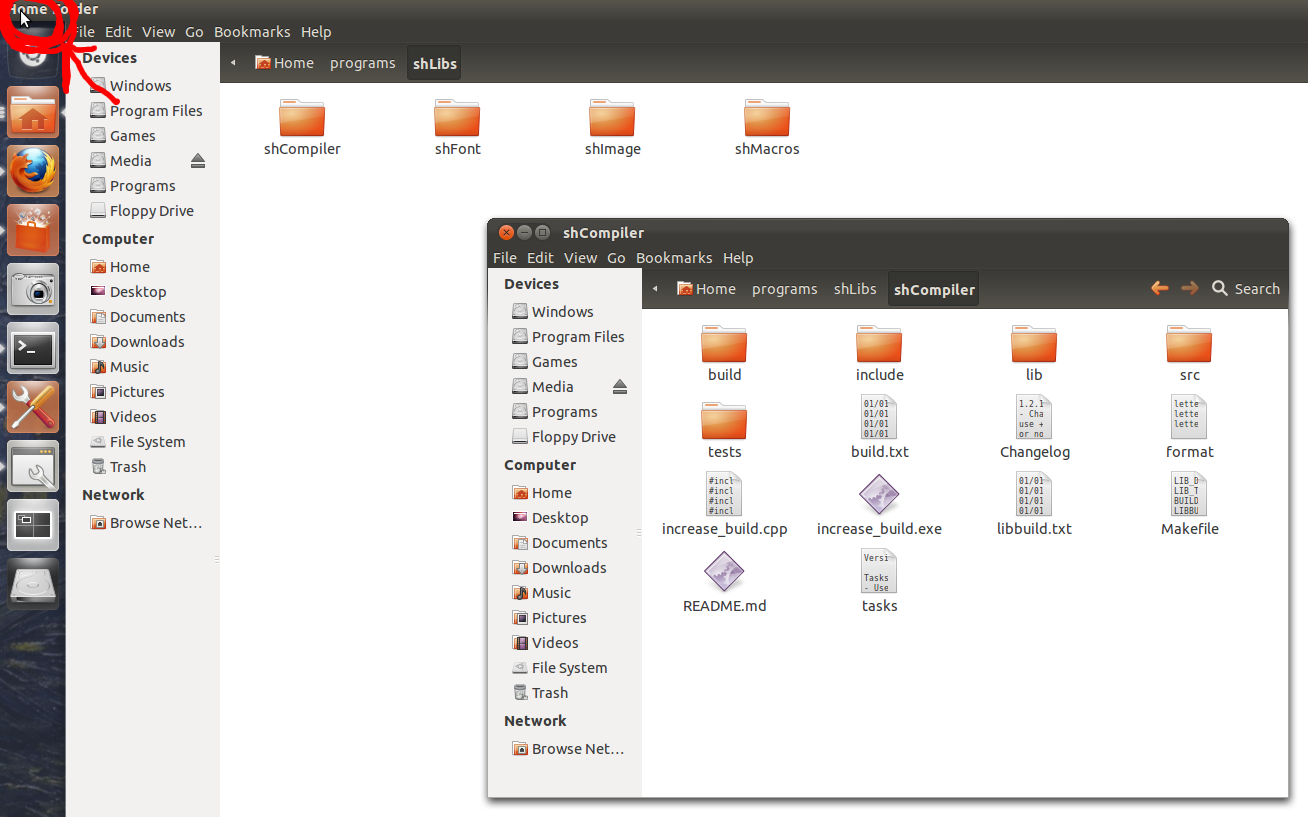
I have the focus on some window and I can't close the maximized window behind it unless I click on the window first, so that the buttons appear and then close it.
I couldn't find anything on the internet about this. Is this something that's hardcoded in unity/compiz/whatever or is there actually a way to configure this?
© Ask Ubuntu or respective owner
