Exchange 2010 POP3/IMAP4/Transport services complaining that they can't find SSL certificate after blue screen
Posted
by
Graeme Donaldson
on Server Fault
See other posts from Server Fault
or by Graeme Donaldson
Published on 2012-04-23T06:46:47Z
Indexed on
2012/11/11
17:04 UTC
Read the original article
Hit count: 575
ssl
|exchange-2010
We have a single-server Exchange 2010 setup. In the early hours of this morning the server had a blue screen and rebooted. After coming back up the POP3/IMAP4 and Transport services are complaining that they cannot find the correct SSL certificate for mail.example.com.
POP3:
Log Name:      Application
Source:        MSExchangePOP3
Date:          2012/04/23 11:45:15 AM
Event ID:      2007
 Task Category: (1)
Level:         Error
Keywords:      Classic
User:          N/A
Computer:      exch01.domain.local
Description:
A certificate for the host name "mail.example.com" couldn't be found.
SSL or TLS encryption can't be made to the POP3 service.
IMAP4:
Log Name:      Application
Source:        MSExchangeIMAP4
Date:          2012/04/23 08:30:44 AM
Event ID:      2007
Task Category: (1)
Level:         Error
Keywords:      Classic
User:          N/A
Computer:      exch01.domain.local
Description:
A certificate for the host name "mail.example.com" couldn't be found.
Neither SSL or TLS encryption can be made to the IMAP service.
Transport:
Log Name:      Application
Source:        MSExchangeTransport
Date:          2012/04/23 08:32:27 AM
Event ID:      12014
Task Category: TransportService
Level:         Error
Keywords:      Classic
User:          N/A
Computer:      exch01.domain.local
Description:
Microsoft Exchange could not find a certificate that contains the domain name
mail.example.com in the personal store on the local computer. Therefore, it
is unable to support the STARTTLS SMTP verb for the connector Default EXCH01
with a FQDN parameter of mail.example.com. If the connector's FQDN is not
specified, the computer's FQDN is used. Verify the connector configuration
and the installed certificates to make sure that there is a certificate with
a domain name for that FQDN. If this certificate exists, run
Enable-ExchangeCertificate -Services SMTP to make sure that the Microsoft
Exchange Transport service has access to the certificate key.
The odd part is that Get-ExchangeCertificate show the cert as enabled for all the relevant services, and OWA is working flawlessly using this certificate.
[PS] C:\Users\graeme\Desktop>Get-ExchangeCertificate

Thumbprint                                Services   Subject
----------                                --------   -------
XXXXXXXXXXXXXXXXXXXXXXXXXXXXXXXXXXXXXXXX  ....S.     CN=exch01
YYYYYYYYYYYYYYYYYYYYYYYYYYYYYYYYYYYYYYYY  ....S.     CN=exch01
ZZZZZZZZZZZZZZZZZZZZZZZZZZZZZZZZZZZZZZZZ  IP.WS.     CN=mail.example.com, OU=Domain Control Validated, O=mail.exa...
Here's the certificate in the computer account's personal cert store:
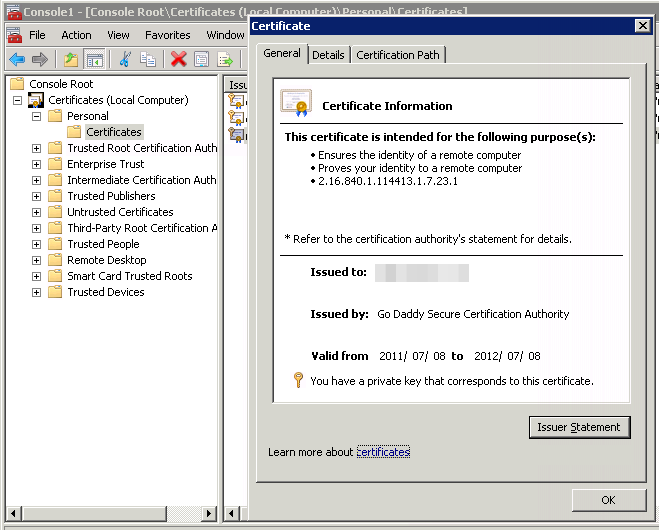
Does anyone have any pointers for getting POP3/IMAP4/SMTP to use the cert again?
© Server Fault or respective owner
